
Frequently Asked Questions (FAQ)
Yes, you can easily install the device yourself as it only requires one hole of 162-180Ø, in addition, the device comes with a regular 230v plug that just needs to be plugged into the socket.
However, it is recommended to have someone authorized to install it for you, we have partners who can do the job. Contact us for a quote.
In addition, we recommend an outward slope of 2-3 degrees when viewed from the inside.
The unit can be installed in walls with a thickness of 250-500mm. For thinner walls, the air duct can be adapted with, for example, our outer part for thin walls where you can get down into 130mm walls.
The device comes with 3 different modes when turned on.
1. Supply mode: The unit supplies only fresh air.
2. Exhaust mode: The unit removes used air.
3. Cycle mode (Heat recovery): The unit recovers heat from the exhaust air and heats/cools the fresh air.
The three indicators on the left show the mode and speed 0-3. That is, 2 Blue shows that the unit is working in Heat Recovery mode and on speed 2.
The indicator on the far right shows something about the device's health or mode.
Blue light: Pairing mode or master-slave connection active.
Green light: WiFi connection active.
Red light: Filter alarm.
Purple light: Indicates the master role in master-slave mode.
The fan speed can be changed with the remote control or on the app, the device has 3 levels as well as boost mode.
The ceramic heat exchanger should be cleaned at least four times a year. Pull it out of the unit with the wire attached, then rinse it in water, but wait until it is COMPLETELY dry before reassembling it.
The ceramic heat exchanger should be cleaned at least four times a year. Pull it out of the unit with the wire attached, then rinse it in water, but wait until it is COMPLETELY dry before reassembling it.
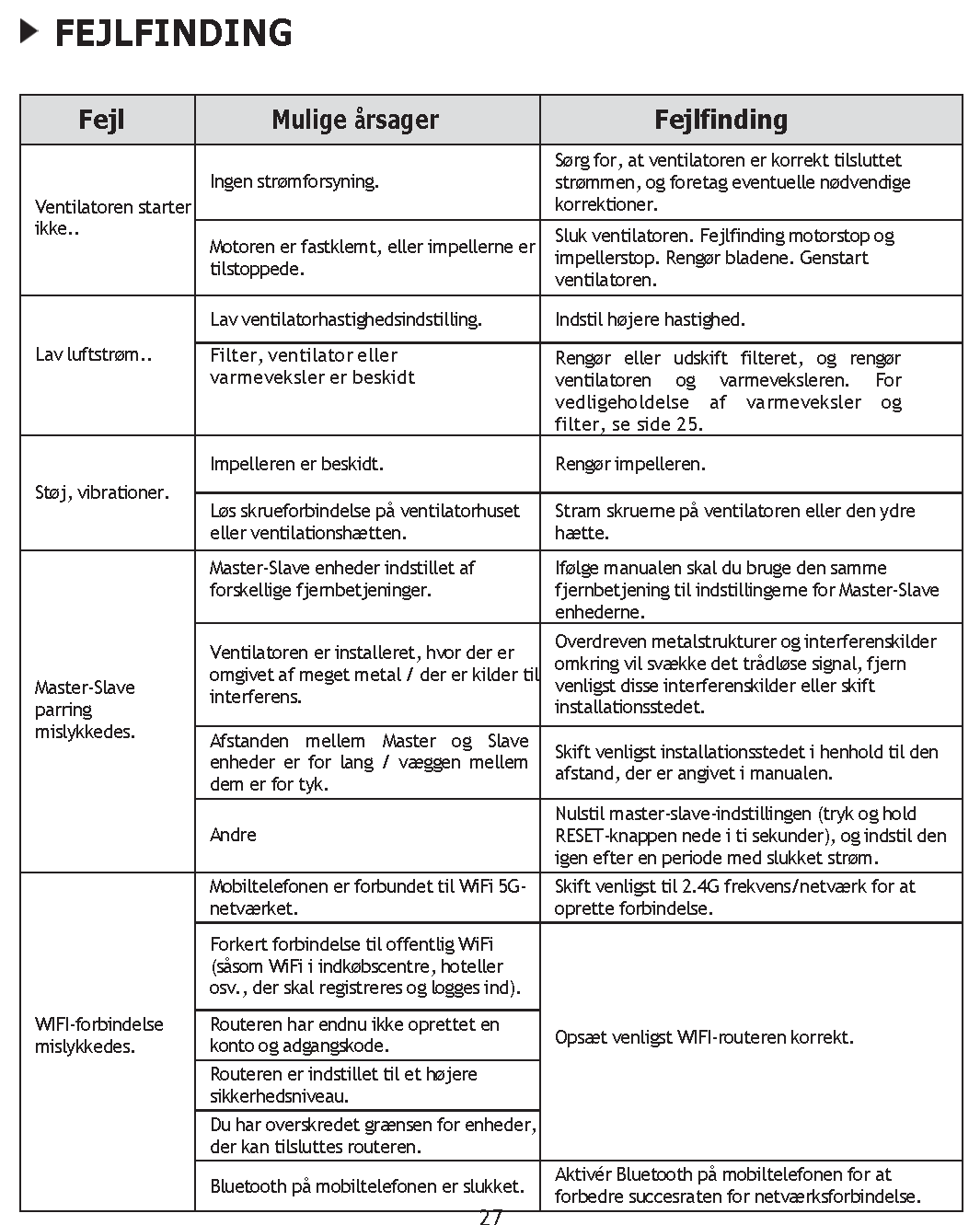
Why won't the fan start? Check that the unit is connected to power correctly.
Check if the motor or impeller is blocked and remove any obstructions.
Low airflow? Make sure the fan speed is set correctly
Clean or replace the filter and clean the heat exchanger
How do I connect the device to WiFi?
Make sure your mobile phone is connected to 2.4G WiFi connection. Turn on Bluetooth and use the "Smart Life" app to configure the network.
What do I do if the WiFi connection fails?
Make sure the phone is using a 2.4G connection.
Avoid using public WiFi networks.
Make sure the router has enough capacity for multiple devices.
Possible cause : The impeller is dirty.
Solution : Clean the impeller with a soft brush or vacuum cleaner.
Possible cause : Loose screws on the fan housing or ventilation hood.
Solution : Tighten the screws to reduce noise and vibration.
Possible cause : Master and Slave units are set with different remote controls.
Solution: Use the same remote control to pair the devices.
Possible cause : The devices are placed too far apart or separated by thick walls.
Solution : Move the devices closer together to improve signal strength.
Contact us at kontakt@dinventilation.dk, or by phone: +4577225484
Contact
E-mail: salg@dinventilation.dk
Phone: +4577225484
Staffed : Every day 10:00-18:00